Keystone Request access

Your architecture diagrams are wrong. It's not your fault.

In Lucidchart, draw.io, Miro or Visio, the same database on three diagrams is three unrelated shapes. Rename it below and see which diagrams keep up. Then flip the switch.

In Keystone, renaming an object updates every diagram that shows it.

Why drawings drift

Rename a shape, and you have to find and fix every copy. Most people fix one. Move it to a new team, and no diagram knows. Remove it, and it lives on in the diagrams nobody opened this quarter.

A few months later nobody trusts the diagrams, so nobody updates them, so they get worse.
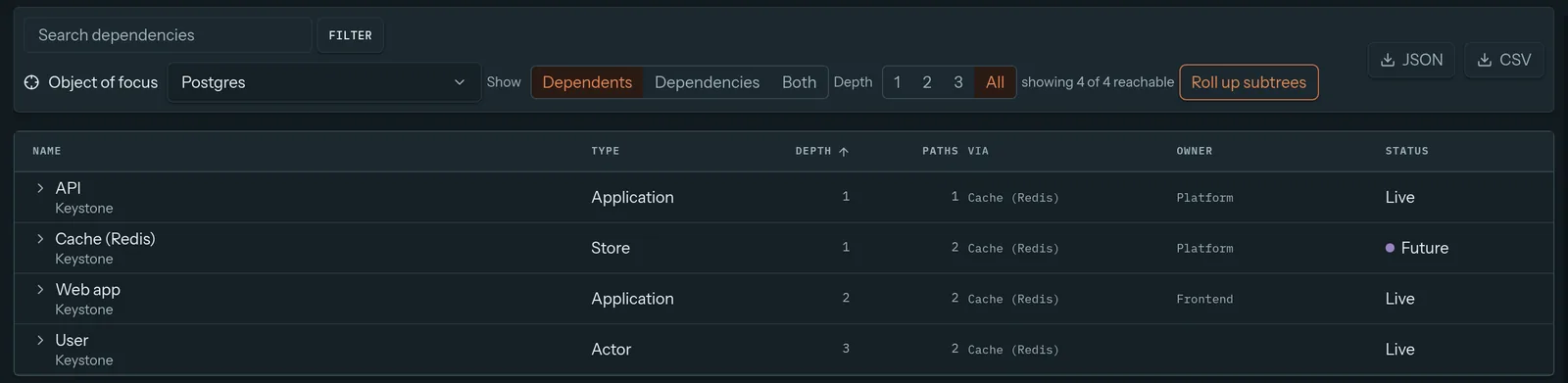
Keystone dependencies view focused on Postgres, listing API, Cache, Web app and User with their depth
Ask Keystone what depends on Postgres, and it answers. A drawing can't.

Side by side

Keystone compared with drawing tools
KeystoneDrawing tools
Same object on many diagramsOne object, always in syncSeparate copies
What depends on this?Dependencies viewSearch every file by hand
Who owns whatTeam owner on every objectOnly if someone typed it
Zoom from company to componentObjects nest; open any one to look insideSeparate files, linked by hand
Proposed changesDrafts with a change list and mergeCopy the file, edit the copy
Spotting mistakesAnyone can flag an object as inaccurateA comment somewhere, if you're lucky
Traffic simulationBuilt inNo
Freeform whiteboardingNot the goalExcellent

Keep your whiteboard

This isn't either-or. Sketch the rough idea in Miro. Map the process in Lucidchart. When the design settles and it's time to record how the system actually works, put it in Keystone, where it will stay true.

Need a picture for a slide deck? Export any Keystone diagram as PNG, SVG or PDF.

Diagrams you can trust again.

Model the system your drawings keep getting wrong.

Request access or write to support@keystone-app.io